Prisma Art Effect Photo Editor
- 4.5
- Rating
- 50.00M
- Installs
- Free
- Price
 Analysis by App-foxy
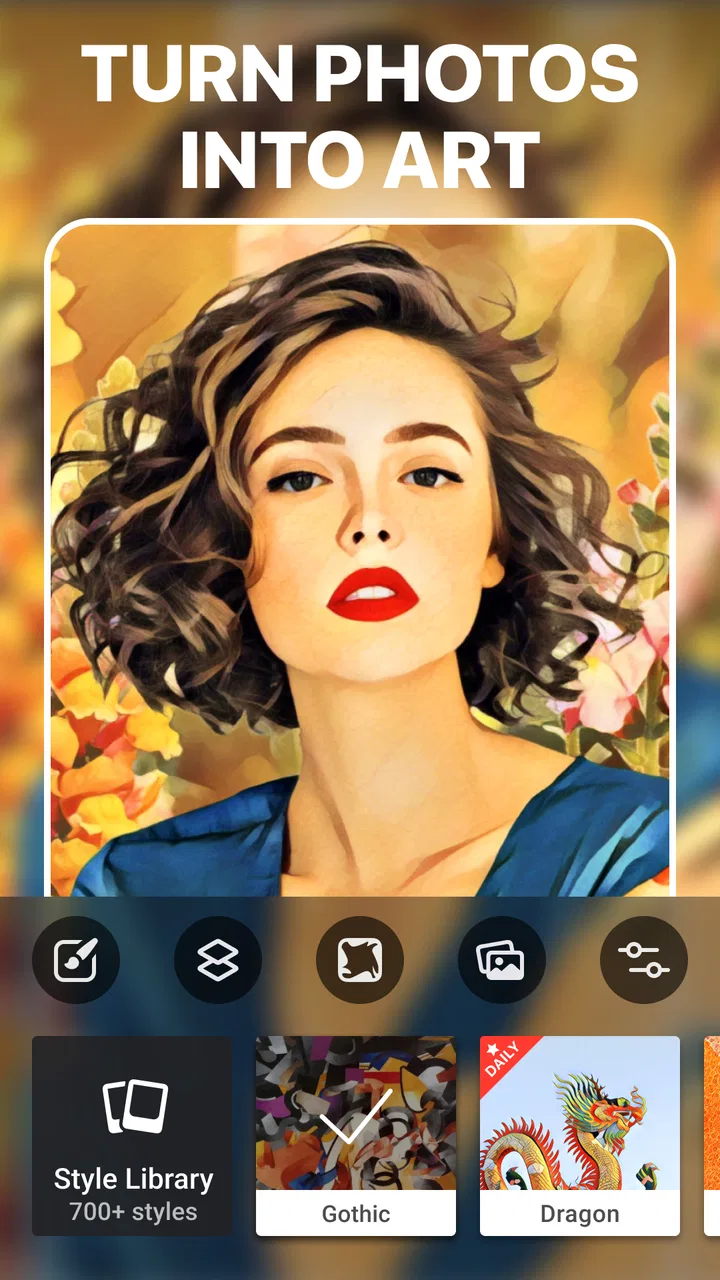
I like photo editors that make a noticeable change without turning every image into a long technical project. Prisma Art Effect Photo Editor sits firmly in that space. It is a photography app from Prisma Labs, Inc. that turns ordinary pictures into stylized artwork, while also offering tools for retouching and playful selfies. I found it most enjoyable when I treated it as a creative finishing tool rather than a complete replacement for a traditional camera or detailed desktop editor.
The app is free to install and suitable for Everyone, although optional in-app purchases range from $0.99 to $49.99 per item. That combination makes it easy to try casually, but it also means a shared phone deserves a little attention before several people start experimenting with paid options. Its current version is 4.6.6.637, and it runs on operating systems from version 9 onward.
How Prisma works in an everyday household
A realistic use case is a shared household tablet or a family phone used during a weekend gathering. Someone takes a group picture, a child wants to see it as a cartoon-like artwork, another person wants a polished portrait, and a parent wants to create something funny for a message. Prisma handles that kind of quick handoff well because its main appeal is immediate visual transformation rather than a complicated editing lesson.
You May Also Like

 Blood Strike: 2.5 Anniversary
Blood Strike’s Loadouts Turn Every Drop Into a Tactical Gamble
A close look at Blood Strike’s custom loadouts: how fast access to signature weapons reshapes its battle royale rhythm, rewards preparation, and narrows the gap between fights.

 Pandora - Music & Podcasts
Pandora’s Music Is Easy to Start, but Harder to Recover
Pandora’s strength is its low-effort path from a seed to a station. Its weak spot is how much confidence it asks you to place in connection, setup, and quiet recovery.

 8 Ball Pool
 Is Built on Rivalries, Rematches, and Routine
A close look at the rivalries, rematches, shared routines, and unanswered safety questions that turn a quick pool match into a persistent mobile community.

 Samsung Music
’s Quiet Strength Is Playing What You Already Own
Its reach comes less from spectacle than from dependable access to a personal library. That simplicity is both the app’s strongest retention engine and its ceiling.

 AccuWeather: Weather Radar
AccuWeather Review: A Quick, Clear Forecast for Everyday Decisions
For everyday plans, the best forecast is the one you can understand quickly. AccuWeather makes rain timing, radar, and local conditions easy to act on, with a few trade-offs.

 Hill Climb Racing
Why Hill Climb Racing Still Turns Crashes Into One More Run
A tiny car, a bumpy hill and one more upgrade: Hill Climb Racing keeps resurfacing because its simple chaos makes every near-miss feel personal.
More From Our News Desk



I would open a photo, try several artistic treatments, and compare the results before saving anything. That simple process is important: the first effect is not always the best one. A bright outdoor image may suit a bold painted treatment, while a close portrait can look better with a softer, less aggressive style. The strongest results usually come from choosing an effect that supports the lighting and subject instead of forcing every picture into the same look.
For shared use, I recommend making a habit of saving finished images with a clear name or moving them into a household album afterward. The editor itself is focused on making the image, not on organizing a family archive. If several people use the same device, the camera roll can become confusing quickly, especially when everyone creates multiple versions of one picture.
The best household workflow is preview first, save selectively, and organize afterward. That small routine prevents duplicate images from taking over the gallery and makes it easier to tell which version was actually approved by the person in the photo.
Creative editing without a steep learning curve
The central experience is approachable. You do not need to understand layers, masks, curves, or advanced color correction to get a visible result. That makes Prisma particularly appealing for someone who wants an artistic profile image, a different version of a travel photograph, or a playful portrait for a private conversation.
At the same time, the simplicity has a trade-off. A specialist editor gives you more control over exactly where an effect appears and how strongly it changes the image. Prisma is better when the desired outcome is “make this look like artwork” than when the task is “correct this particular shadow while preserving every skin tone.” I would use another editor first for careful exposure correction, cropping, or detailed retouching, then bring a suitable image into Prisma for the creative finish.
That two-step workflow is one of the most useful ways to combine it with other photography tools. Start with a clean, well-exposed original in your usual gallery editor. Remove distractions, straighten the frame, and make sure faces are visible. Then apply Prisma’s artistic treatment. Stylized filters can hide small flaws, but they can also exaggerate blur, harsh lighting, or cluttered backgrounds. Preparing the image first gives the effect a better foundation.
Choosing images that survive strong effects
Not every photograph benefits from a dramatic transformation. Images with one clear subject tend to be easier to judge than busy group shots. A portrait with visible eyes and even lighting generally gives a more convincing result than a dark selfie taken under a colored lamp. Landscapes can work well when the horizon is straight and the main shapes are easy to recognize.
I also suggest keeping the original image untouched. Artistic effects are a matter of taste, and a result that feels exciting today may seem excessive later. Saving a new version rather than replacing the source gives you freedom to try a different treatment, crop the image again, or use the unedited photo in another project.
For a household, this matters even more. One person may prefer a subtle portrait while another enjoys an exaggerated effect. Keeping the original avoids an argument over whose version should remain in the gallery. It also makes the app safer for experimentation when a less experienced user is holding the device.
Retouching, selfies, and the line between fun and realism
Prisma is not limited to painterly effects. Its store description also points to retouching and funny selfie work, and those uses give the app a lighter personality. I see the selfie side as best suited to jokes, casual sharing, and temporary creative posts rather than formal portrait preparation.
With retouching, restraint is valuable. A small adjustment can make a picture feel more finished, while too much editing can make the subject look disconnected from the setting. I would compare the edited image with the original before sharing it, especially when other people appear in the frame. A funny treatment should be recognizable as playful, not something that embarrasses a friend or family member who did not expect their appearance to be changed.
This is one area where household coordination matters. If a child takes a picture of a sibling or parent, the person in the image should have a say before it is shared. The app makes transformation easy, but convenience should not replace consent. That is less a technical feature than a practical rule that keeps a creative tool from becoming a source of friction.
Setting boundaries on a shared device
Because the app is free to download but includes optional purchases, I would establish a simple household rule before handing over the phone: everyone may explore the free experience, but any paid choice needs the device owner’s approval. I would not assume that a younger user understands that an attractive effect can involve a purchase simply because the app itself costs nothing to install.
The most reliable boundary is active supervision at the moment a purchase is considered. Do not treat a shared device as if every user has the same permission or the same understanding of payment screens. If the phone belongs to one adult but is used by several people, the owner should remain the person who decides whether an optional item is worthwhile.
It is also sensible to explain the difference between editing and sharing. A child may understand how to apply an effect but not realize that a finished image can reveal faces, locations, school clothing, or other personal details. Prisma is a creative editor, not a substitute for a family conversation about what belongs in a private gallery and what is appropriate to send elsewhere.
For adults sharing a device, the boundary is usually simpler but still useful. Agree on whether other users may edit one another’s pictures, whether originals must be preserved, and where finished images should be stored. These decisions prevent accidental changes and make the app more pleasant when the camera roll belongs to several people.
Coordination when several people are creating images
Prisma works best in a shared setting when users take turns and communicate what they are trying to make. One person can choose the source image, another can compare artistic treatments, and the owner of the picture can make the final choice. That turns the app into a small collaborative activity instead of a race to apply the most dramatic effect.
A useful approach is to create a short selection process. First, keep the original visible. Next, choose two or three noticeably different treatments rather than saving every variation. Finally, ask the subject which version feels most like them. This reduces clutter and gives the person in the image control over how they are represented.
When the device is passed between generations, expectations can differ. A teenager may want a bold profile image, while a grandparent may prefer a recognizable portrait with only a gentle artistic change. There is no single correct style, so I would avoid presenting one effect as objectively better. The app is more rewarding when users treat the preview stage as part of the creative decision.
Another practical tip is to avoid editing while someone is waiting to make an urgent call or use the camera. Artistic experimentation can take longer than expected because each person wants to see several versions. On a shared device, agreeing on a short session keeps the app from becoming a source of household annoyance.
Age, trust, and handling other people’s photos
The Everyone content rating makes Prisma approachable for a broad audience, but an age label does not remove the need for guidance. The important question in a family is not only whether someone can operate the editor. It is whether they understand permission, privacy, purchases, and the difference between a joke that stays private and one that gets shared.
I would be comfortable introducing the creative side to a younger user while staying nearby for the first few sessions. Let them choose a picture and compare effects, but make the saving and sharing decision together. This also gives adults a chance to explain why a photo of another person should not be altered or distributed without asking.
Trust works both ways. Adults should not assume that every edited image is harmless, and younger users should not feel that every creative experiment will be criticized. A clear rule such as “edit freely, share thoughtfully” is easier to follow than a blanket ban. It preserves the fun while making the social consequences visible.
For portraits of children, I would be especially selective about where the results go. Keeping them in the device’s private gallery may be appropriate for a family activity, while posting them publicly is a separate decision. The artistic effect does not make the underlying photograph anonymous; recognizable faces remain recognizable.
Where it stands beside ordinary photo editors
Compared with a standard phone gallery editor, Prisma offers a much stronger sense of transformation. Ordinary editors are usually better for practical corrections such as brightness, rotation, cropping, and color balance. Prisma is the more interesting choice when the goal is to change the mood or identity of the image through an artistic treatment.
Compared with a full creative suite, it is less demanding and less precise. A professional workflow often needs selective adjustments, detailed masking, typography, compositing, and repeatable control. Prisma’s appeal is that it reaches a visually distinctive result with far less effort. I would choose it for a quick creative post, a playful family project, or an experimental portrait, not for a carefully controlled commercial image.
It also differs from a typical beauty camera. A beauty-focused tool usually aims to make a selfie look polished in a familiar way. Prisma is more willing to make the image feel illustrated, unusual, or intentionally artificial. That is a strength when you want personality, but a weakness if your only goal is natural-looking skin and a realistic camera finish.
One of my favorite trade-offs is speed versus consistency. Prisma can produce a memorable single image quickly, but if you need a whole album to share the same restrained visual treatment, a more controlled editor may be easier to manage. For a small set of standout pictures, its distinctive look is an advantage. For a large event album, consistency and organization may matter more than novelty.
What the app’s popularity tells me
Prisma has been available since July 24, 2016, and its reach is substantial: it has passed 50 million installs, carries an average rating of 4.5 from around 1 million ratings, and has about 20 thousand written reviews. Those figures suggest that the concept has remained appealing to a large audience over time, especially among people who want something more expressive than a basic filter.
Popularity is not proof that every user will love the results. Artistic editing is subjective, and the same strong effect that makes one portrait memorable can make another look too artificial. I would judge it by the kind of images you actually make, not by the size of its audience. If your camera roll is mostly documents, receipts, product shots, or carefully realistic portraits, its main attraction may not match your needs.
The free entry point lowers the risk of trying it, but I would still approach optional purchases deliberately. Experiment with the available experience, decide whether the visual style fits your habits, and only then consider spending. The value is highest for someone who will regularly create stylized images, not for a person who opens the editor once and returns to ordinary corrections.
Small workflows that make better results
My first practical workflow is the “clean first, stylize second” method. I correct the image in a familiar editor, remove obvious distractions, and check that the subject is not too dark. Only then do I use Prisma for the artistic change. This avoids asking one effect to solve problems it was never meant to solve.
The second is the “three-version limit.” I choose a maximum of three promising treatments, save only the strongest one or two, and compare them away from the editing screen. This is especially helpful on a shared device because it keeps the gallery manageable and encourages a real choice instead of endless collecting.
The third is to match the effect to the purpose. For a profile image, I favor a treatment that preserves facial expression and silhouette. For a humorous family image, I can accept something more exaggerated. For a landscape, I look for an effect that emphasizes large shapes rather than destroying fine detail. Thinking about where the image will be used produces better results than choosing an effect solely because its preview looks dramatic.
A fourth useful habit is to review the image at normal size before sharing. An effect can look impressive while zoomed out but reveal distracting texture or strange facial details when viewed closely. This check is particularly important for selfies and group photos, where small distortions can change how a person looks.
Who should use it, and who should skip it
I would recommend Prisma to casual photographers, families making playful keepsakes, users who want artistic profile pictures, and anyone who enjoys trying visual styles without studying a complex editing system. It is also a good companion for people who already have a basic editor and want a more expressive final step.
I would skip it if you need precise professional retouching, reliable batch consistency, extensive layout tools, or a strictly natural appearance. It is also not the ideal first choice for someone whose main concern is organizing a large photo library. The app can make individual images more interesting, but it does not replace the broader workflow of a dedicated photo-management or professional editing tool.
For a shared household, I would recommend it with clear boundaries around purchases, consent, and saving originals. It can be a pleasant group activity when everyone understands who owns the source photo and who gets the final say. Without those agreements, the same ease that makes the app fun can lead to unwanted edits, crowded galleries, or uncomfortable sharing.
My household verdict
After using Prisma as an artistic editor rather than a general-purpose photo utility, I see its strongest quality clearly: it helps ordinary pictures feel more personal and imaginative with very little effort. The app is approachable, visually distinctive, and flexible enough for portraits, landscapes, selfies, and family experiments.
Its limitations are equally clear. It cannot offer the fine control of a serious editor, dramatic treatments will not suit every photograph, and free installation does not mean every optional choice is free. Shared-device users should also remember that creative access and sharing permission are separate matters.
For me, Prisma Art Effect Photo Editor is worth keeping when I want a quick artistic idea, a memorable portrait, or a fun activity with other people in the room. I would pair it with a conventional editor for technical corrections and with a simple household agreement for privacy and purchases. If that balance matches how you use photos, this free photography app is easy to recommend; if you mainly want realistic corrections and careful control, a traditional alternative will serve you better.
FAQs for Prisma Art Effect Photo Editor
01What is Prisma Art Effect Photo Editor used for?
Prisma Art Effect Photo Editor is designed to transform ordinary photos into artwork inspired by different painting styles. After selecting an image, you can apply artistic filters that resemble illustrations, oil paintings, sketches, and other visual techniques. The app is mainly intended for creative photo editing, social media posts, profile pictures, digital artwork, and experimenting with new looks rather than traditional manual editing alone.
02Does Prisma Art Effect Photo Editor require an internet connection?
Some features may work directly on your device, but an internet connection can be required for downloading certain filters, processing specific effects, synchronizing content, or accessing updated creative tools. Availability may vary depending on the version of the app and your device. If you plan to edit photos while traveling or without mobile data, it is a good idea to test the desired filters in advance.
03Is Prisma Art Effect Photo Editor free to download?
Prisma Art Effect Photo Editor can generally be downloaded for free, but the free version may include limitations such as advertisements, a restricted selection of artistic styles, or access to only basic editing tools. Premium options may be offered through subscriptions or in-app purchases. Before confirming a purchase, check the current pricing, renewal terms, and which filters or features are included in the selected plan.
04Can I use Prisma to edit photos from my gallery and take new pictures?
Yes, the app is primarily built around importing images from your device gallery, allowing you to apply artistic effects to photos you have already taken. Depending on the version and permissions granted, it may also provide access to the camera for creating new images. You should review the requested permissions carefully and make sure the app can access only the photos or camera functions you are comfortable sharing.
05Are the edited images saved in high quality, and can I share them?
After applying an effect, Prisma typically lets you save the finished image to your device and share it through compatible apps such as social networks, messaging platforms, or email. Export quality and available saving options can depend on the selected filter, account type, app version, and subscription status. For professional printing or commercial projects, check the exported resolution and usage conditions before relying on the result.
Pros
- Turns ordinary photos into paintings with distinctive artistic styles.
- Large selection of filters inspired by famous art movements and artists.
- Simple interface makes applying and comparing effects quick.
- Regularly adds new styles and creative editing options.
- Processed images can be saved and shared directly from the app.
Cons
- Many premium styles require a paid subscription or purchase.
- Some effects take time to process
- especially on older devices.
- Heavy filters may reduce fine details in high-resolution photos.
- An internet connection may be needed for certain editing features.
- The subscription can feel expensive for occasional photo editing.

Prisma Art Effect Photo Editor
Gallery